Author Archives: SaltwaterC

About SaltwaterC

Mr. Sarcasm, Developer, Sysadmin.

Use the cache, Luke, Part 2: don’t put all your eggs into the memcached buck … basket

This is the second part of a series called: Use the cache, Luke. If you missed the first part, here it is: From memcached to Membase memcached buckets. Meanwhile, the AWS ElastiCache service proved to have better network latency than our own rolled out Membase setup, therefore the migration was easily done by simply switching the memcached config. No vendor lock in.

However, it took me a while to write this second part.

If you can see this, then you might need a Flash Player upgrade or you need to install Flash Player if it’s missing. Get Flash Player from Adobe. This error may appear if the URL path to the embedded object is broken or you have connectivity issue to the embedded object. Powered BY XVE Various Embed.

Please have a look at the above video. Besides the general common sense guidelines about how to scale your stuff, and the Postgres typical stuff, there’s a general rule: cache, cache, and then cache some more.

However, too much caching in memcache (whatever implementation) may kill the application at some point. The application may not be database dependent, but it is cache dependent. Anything that affects the cache may have the effect of a sledgehammer on your database. Of couse, you can always scale vertically that DB instance, scale horizontally by adding read-only replicas, but the not-so-fun part is that it costs a lot just to have the provisioned resources in order to survive a cache failure.

The second option is to have a short lived failover cache on the application server. Something like five minutes, while the distributed cache from memcache may last for hours. Enough to keep the database from being hit from live traffic, while you don’t have to provision a really large database instance. Of course, it won’t work with stuff that needs some “real time” junk, but it works with data that doesn’t change with each request.

There are a lot of options for a failover cache since there’s no distributed setup to think about. It may be a memcached daemon, something like PHP’s APC API, or, the fastest option: the file based caching. Now you may think that I’m insane, but memcached still has the IPC penalty, especially for TCP communication, while if you’re a PHP user, APC doesn’t perform as expected.

I say file based caching, not disk based caching, as the kernel does a pretty good job at “eating your RAM” with the disk caching stuff. It takes more to implement it since the cache management logic must be implemented into the application itself, you don’t have stuff like LRU, expiration, etc. by default, but for failover reasons, it is good enough to worth the effort. In fact, it ran for a few days on the failover cache without any measurable impact.

The next part for not using the same basket for all of your eggs is: cache everywhere you can. For example, by using the nginx FastCGI cache, we could shave off 40% of our CPU load. Nothing experimental about this last part. It is production for the last 18 months. If you get it right, then it could be a really valuable addition to a web stack. However, a lot of testing is required before pushing the changes to production. We hit a lot of weird bugs for edge cases. The rule of thumb is: if you get the cache key right, then most of the issues are gone before going live.

In fact, by adding the cache control stuff from the application itself, we could push relatively shortly lived pages to the CDN edges, shaving off a lot of latency for repeated requests as there’s no round trip from the hosting data center to the CDN edge. Yes, it’s the latency, stupid. The dynamic acceleration that CDNs provide is nice. Leveraging the HTTP caching capabilities is nicer. Having the application in a data center closer to the client is desirable, but unless your target market is more distributed than having a bunch of machines into the same geo location, it doesn’t make any sense to deploy into a new data center which adds its fair share of complexity when scaling the data layer.
Reverse dependencies for the installed packages in Debian + friends

Some libraries are more libraries than others. It is one of those moments when you ask yourself if migrating to a newer version of a library fucks up the entire system. But you need that foo library as it implements feature bar. In my case, I wanted libpcre3 8.20+ in order to enable PCRE JIT. Though luck. Not even Debian sid packages 8.20.

Now I know that there’s apt-cache rdepends, but it lists all the reverse dependencies of a specific package. I needed just the reverse dependencies of the installed packages. With a little bash-fu, here it goes:

#!/bin/bash
 
function package_rdepends
{
	for package in $(apt-cache rdepends $1 | grep -Ev "^$1$" | grep -v 'Reverse Depends:')
	do
		apt-cache policy $package | grep 'Installed: (none)' > /dev/null 2>&1
		if [ $? -eq 1 ]
		then
			echo $package
		fi
	done
}
 
package_rdepends $1 | sort -u

Saved as installed-rdepends. Made executable.

./installed-rdepends libpcre3
grep
libglib2.0-0
libglib2.0-dev
libpcre3-dev
libpcrecpp0

The above script may be slow for packages with many reverse dependencies due to the fact that each package has an individual lookup. Didn’t have the patience to measure the time it takes to do a lookup for libc6. Some benchmarks for the package lookup:

time apt-cache policy libpcre3 | grep 'Installed: (none)' > /dev/null 2>&1
 
real	0m0.006s
user	0m0.005s
sys	0m0.003s
 
time dpkg -L libpcre3 > /dev/null 2>&1
 
real	0m0.017s
user	0m0.012s
sys	0m0.005s
 
time dpkg -l libpcre3 > /dev/null 2>&1
 
real	0m0.667s
user	0m0.600s
sys	0m0.067s
 
time dpkg -s libpcre3 > /dev/null 2>&1
 
real	0m0.587s
user	0m0.533s
sys	0m0.054s
 
time cat /var/lib/dpkg/available | grep -E "Package: libpcre3$" > /dev/null 2>&1
 
real	0m0.034s
user	0m0.015s
sys	0m0.048s

However, I didn’t try these results on a bare metal installation.

Inlining the PEM encoded files in node.js

Multi line strings in JavaScript are a bitch. At least till ES6. The canonical example for a node.js HTTPS server is:

// curl -k https://localhost:8000/
var https = require('https');
var fs = require('fs');
 
var options = {
  key: fs.readFileSync('test/fixtures/keys/agent2-key.pem'),
  cert: fs.readFileSync('test/fixtures/keys/agent2-cert.pem')
};
 
https.createServer(options, function (req, res) {
  res.writeHead(200);
  res.end("hello world\n");
}).listen(8000);

All fine and dandy as the sync operation doesn’t penalize the event loop. It is associated with the server startup cost. However, jslint yells about using sync operations. As the code is part of the boilerplate for testing http-get, refactoring didn’t make enough sense. Making jslint to STFU is usually the last option. The content of the files never changes, therefore it doesn’t make any sense to read them from the disk either. Inlining is the obvious option.

Couldn’t find any online tool to play with. Therefore I fired a PHP REPL, then used my PCRE-fu to solve this one. The solution doesn’t look pretty, but it gets the job done:

php > var_dump(preg_replace('/\n/', '\n\\' . "\n", file_get_contents('server.key')));
string(932) "-----BEGIN RSA PRIVATE KEY-----\n\
MIICXAIBAAKBgQCvZg+myk7tW/BLin070Sy23xysNS/e9e5W+fYLmjYe1WW9BEWQ\n\
iDp2V7dpkGfNIuYFTLjwOdNQwEaiqbu5C1/4zk21BreIZY6SiyX8aB3kyDKlAA9w\n\
PvUYgoAD/HlEg9J3A2GHiL/z//xAwNmAs0vVr7k841SesMOlbZSe69DazwIDAQAB\n\
AoGAG+HLhyYN2emNj1Sah9G+m+tnsXBbBcRueOEPXdTL2abun1d4f3tIX9udymgs\n\
OA3eJuWFWJq4ntOR5vW4Y7gNL0p2k3oxdB+DWfwQAaUoV5tb9UQy6n7Q/+sJeTuM\n\
J8EGqkr4kEq+DAt2KzWry9V6MABpkedAOBW/9Yco3ilWLnECQQDlgbC5CM2hv8eG\n\
P0xJXb1tgEg//7hlIo9kx0sdkko1E4/1QEHe6VWMhfyDXsfb+b71aw0wL7bbiEEl\n\
RO994t/NAkEAw6Vjxk/4BpwWRo9c/HJ8Fr0os3nB7qwvFIvYckGSCl+sxv69pSlD\n\
P6g7M4b4swBfTR06vMYSGVjMcaIR9icxCwJAI6c7EfOpJjiJwXQx4K/cTpeAIdkT\n\
BzsQNaK0K5rfRlGMqpfZ48wxywvBh5MAz06D+NIxkUvIR2BqZmTII7FL/QJBAJ+w\n\
OwP++b7LYBMvqQIUn9wfgT0cwIIC4Fqw2nZHtt/ov6mc+0X3rAAlXEzuecgBIchb\n\
dznloZg2toh5dJep3YkCQAIY4EYUA1QRD8KWRJ2tz0LKb2BUriArTf1fglWBjv2z\n\
wdkSgf5QYY1Wz8M14rqgajU5fySN7nRDFz/wFRskcgY=\n\
-----END RSA PRIVATE KEY-----\n\
"
php > var_dump(preg_replace('/\n/', '\n\\' . "\n", file_get_contents('server.cert')));
string(892) "-----BEGIN CERTIFICATE-----\n\
MIICRTCCAa4CCQDTefadG9Mw0TANBgkqhkiG9w0BAQUFADBmMQswCQYDVQQGEwJS\n\
TzEOMAwGA1UECBMFU2liaXUxDjAMBgNVBAcTBVNpYml1MSEwHwYDVQQKExhJbnRl\n\
cm5ldCBXaWRnaXRzIFB0eSBMdGQxFDASBgNVBAMTC1N0ZWZhbiBSdXN1MCAXDTEx\n\
MDgwMTE0MjU0N1oYDzIxMTEwNzA4MTQyNTQ3WjBmMQswCQYDVQQGEwJSTzEOMAwG\n\
A1UECBMFU2liaXUxDjAMBgNVBAcTBVNpYml1MSEwHwYDVQQKExhJbnRlcm5ldCBX\n\
aWRnaXRzIFB0eSBMdGQxFDASBgNVBAMTC1N0ZWZhbiBSdXN1MIGfMA0GCSqGSIb3\n\
DQEBAQUAA4GNADCBiQKBgQCvZg+myk7tW/BLin070Sy23xysNS/e9e5W+fYLmjYe\n\
1WW9BEWQiDp2V7dpkGfNIuYFTLjwOdNQwEaiqbu5C1/4zk21BreIZY6SiyX8aB3k\n\
yDKlAA9wPvUYgoAD/HlEg9J3A2GHiL/z//xAwNmAs0vVr7k841SesMOlbZSe69Da\n\
zwIDAQABMA0GCSqGSIb3DQEBBQUAA4GBACgdP59N5IvN3yCD7atszTBoeOoK5rEz\n\
5+X8hhcO+H1sEY2bTZK9SP8ctyuHD0Ft8X0vRO7tdt8Tmo6UFD6ysa/q3l0VVMVY\n\
abnKQzWbLt+MHkfPrEJmQfSe2XntEKgUJWrhRCwPomFkXb4LciLjjgYWQSI2G0ez\n\
BfxB907vgNqP\n\
-----END CERTIFICATE-----\n\
"
php >

This gave me usable multi line strings that don’t break the PEM encoding.

Update: shell one liner with Perl

cat certificate.pem | perl -p -e 's/\n/\\n\\\n/'

Doing what Dropbox is doing and doing it wrong

Let’s take a couple of examples. Switched from an older machine recently, therefore I need to setup all my stuff. As I don’t like to depend on a single service, for redundancy’s sake, I also keep a backup for Dropbox.

SpiderOak – backs up stuff, uses client side encryption, has optional sync between your machines. So far, so good. In the latest OS X client, at least, the possibility to paste the password is missing. Thanks, I’ll me use my password manager instead with services that don’t do such a braindead thing. Seriously, there’s a thing that improves the security of the password authentication. It is called two factor authentication. Dropbox has it. Google has it. In fact, any decent service has it. Disabling the possibility to paste the password, not so much.

Google Drive – you wouldn’t think I’m letting Google of the hook this time. As I don’t trust with my data these sync services, I always do client side encryption. Dropbox doesn’t choke on it, SpiderOak doesn’t choke on it. Google Drive must be a special kind of breed as it chokes on my encrypted files with “Upload Error – An unknown issue has occurred “. Gee, let me fix the error message for you: “your piece of shit encrypted files aren’t of any use for us, there’s no personal info there”. Was it that difficult? Thanks, but the market is full of alternatives. Seriously Google, you could do better than this “not being evil” thing.

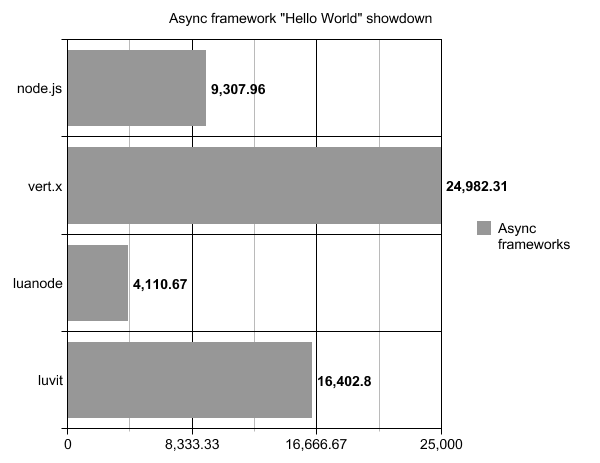
Async frameworks “Hello World” showdown

This is not intended to be a proper comparison between these frameworks. However, since the “Hello World” test is the lowest common denominator, it is a pretty clear indicator that an application can’t exceed in performance these numbers. Also, what Guillermo did not understand from my comment is the fact that 1000 requests at the concurrency of 10 is way to few for get a proper picture of a “Hello World” showdown.

Tested frameworks:

  • node.js – v0.6.17
  • vert.x – v1.0 final + OpenJDK 7 installed from the Ubuntu repository – using the JavaScript bindings
  • luanode – built from the master branch using the Ubuntu provided lua dependencies
  • luvit – built from the master branch
  • react – cloned the master branch

I also wanted to test node.native, but it kept crashing on me. You can see that it is a pretty old issue. I didn’t have the patience to make the v0.1.0 branch to work with the previously used code. But I’d like to give it a run for its money.

The system used for the testing is a modest Athlon II X2 240e (2.8GHz) with 4GB or DDR2 800MHz running the latest Kubuntu 12.04 LTS amd64. Since ab pretty much takes a CPU core for itself, the frameworks ran a single process that occupied a single CPU core. I tried running a node.js HTTP server wrapped with the cluster module. Or passing -instances 2 to the vertx framework. The results were pretty much the same, therefore using just a single CPU core is a fair comparison.

The ab command that I used to hammer the Hello World! output:

ab -r -k -n 1000000 -c 1000 http://127.0.0.1:{port_name}/

The command ran at least a couple of times before saving the results. Just to make sure that everything is properly warmed up.

The averages graph:

The test sources and full ab output is available on this gist. There’s interesting output in the results.txt file for the stats nerds.

PS: I have the impression (but did not test) that vert.x may be a little bit faster, but ab is the actual bottleneck.

Update: added React (node.php) to comparision. Too lazy to plot another graph. But at 1573.40 req/s, it is harly a match even for luanode. Used the PHP 5.3.10 from the Ubuntu repositories.

Update: added another React (node.php) to comparision, but with a custom build of PHP 5.4.3. This time, it managed to get 3727.49 req/s.